Painting New Weather onto Real Off-Road Video with Ray and NVIDIA Cosmos Transfer 2.5
Night rain, blizzards and wildfire smoke are rare in off-road driving logs, and those are the conditions where a perception model most needs examples. We took real ATV footage from TartanDrive 2.0 and used NVIDIA Cosmos Transfer 2.5 to repaint each clip in a new condition while keeping the trail, the bumps and the camera path of the original drive. On 8 A100 GPUs, Ray produced 288 weather variants in 51.5 minutes, and every request succeeded on its first attempt.
We built the workflow from four Ray pieces on one cluster: Ray Data prepares clips and scores outputs, persistent Ray actors keep the 2B-parameter model loaded on each GPU, a small scheduler built on ray.wait handles retries and resume, and Ray Serve turns the same actors into an app where anyone can pick a drive, type a condition and watch 8 GPUs paint at once. The template includes a replay of stored results that runs without GPUs; generating new clips requires GPU resources.
Try it
Pick a drive and a condition. The player below replays results we generated with the batch pipeline, at the model's native 1024×544, with the original camera on the left of the line and the repaint on the right. Switch to "All 9 drives" to see one prompt applied across every scene.
The live app, start to finish
The replay mirrors a live Ray Serve application. In the recording below, a first-time visitor picks a drive, chooses golden hour and sends it to all 8 GPUs. The page shows each GPU's progress while Cosmos runs, then lays out the 8 repaints with a comparison slider.
Motivation
Ground robots that leave the road meet conditions their training logs barely cover. Capturing a night rainstorm on a specific trail means waiting for the weather, sending a crew out in it and labeling the result again. Simulators offer control, but their terrain rarely looks like a real hillside of wet grass and loose gravel.
World foundation models offer a third route. Cosmos Transfer 2.5 takes a real video, a control signal derived from it and a text prompt, and generates a new video that follows the control. We use the edge map of every frame as the control. Because the edges come from the real recording, the generated clip keeps the trail's layout and the vehicle's motion, while the prompt sets the light, weather, season and surface.
How a clip is repainted
- Input. 93 frames (5.8 seconds) from the ATV's front camera, resampled from 10 Hz to the model's 16 fps by repeating the nearest frame, never by interpolation.
- Control. Canny edges computed once per clip at the model's working resolution and stored losslessly, so every condition and seed reuses the same control video.
- Generation. The distilled edge model runs 4 denoising steps and writes a 1024×544 video.
- Guardrails. A text check before generation and a video check after it. Every result in this post was generated with both on.
- Validation. Each output is probed for frame count, size and frame rate before it is recorded as done.
Dataset: TartanDrive 2.0
| Item | Value |
|---|---|
| Source | TartanDrive 2.0, CC BY 4.0, ATV front camera (image_left_color) |
| Drives | 9 recorded runs |
| Clips | 27 prepared (3 per drive); 24 used in the main run, 9 showcase scenes for the extra conditions |
| Download | 13.39 GB in 82.75 s |
| Clip format | 93 frames, 1024×544, 16 fps |
Results
Scaling: per-request time stays flat
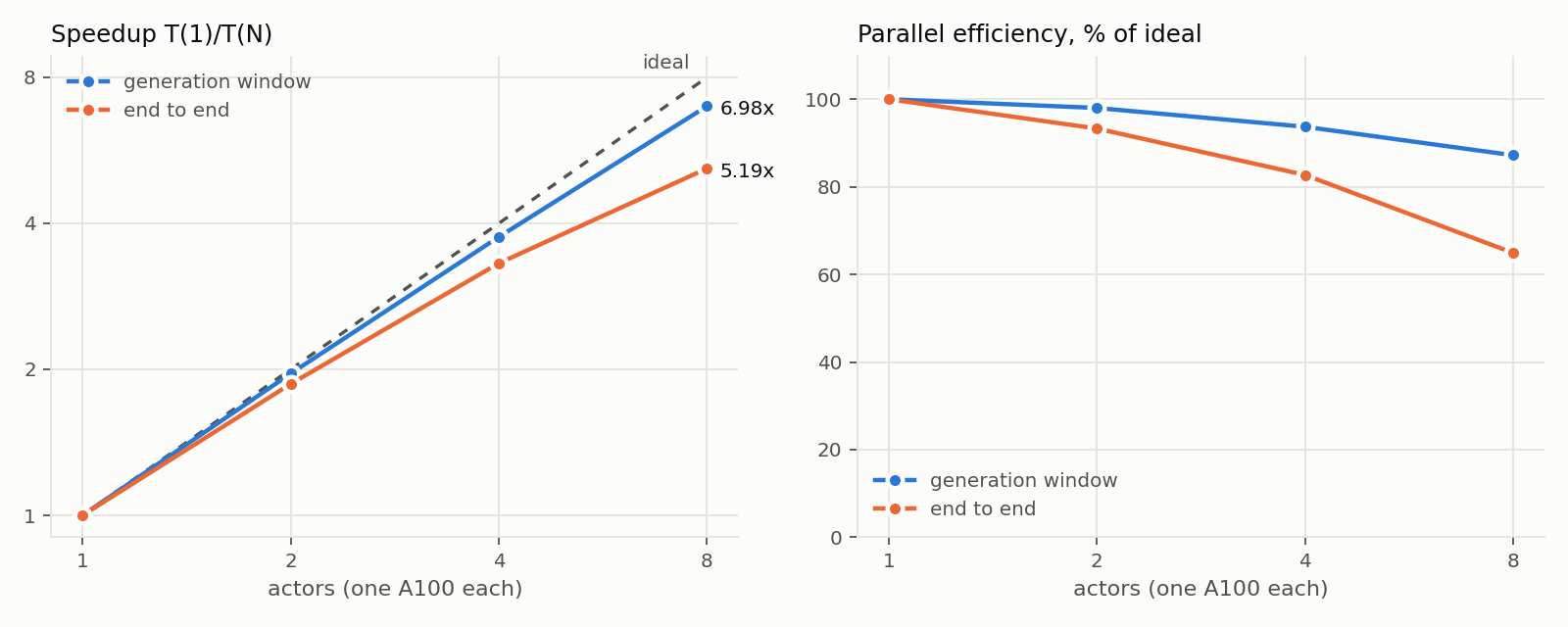
We ran the same 24 requests on 1, 2, 4 and 8 actors, each with one A100, in fresh namespaces with no resume. The median request took 79.79 seconds on one actor and 80.27 seconds with eight running side by side: actors do not slow each other down.
| Actors | Wall time | Speedup, generation | Speedup, end to end | Median per request |
|---|---|---|---|---|
| 1 | 2067.75 s | 1.00x | 1.00x | 79.79 s |
| 2 | 1107.90 s | 1.96x | 1.87x | 80.19 s |
| 4 | 624.94 s | 3.75x | 3.31x | 80.26 s |
| 8 | 398.39 s | 6.98x | 5.19x | 80.27 s |
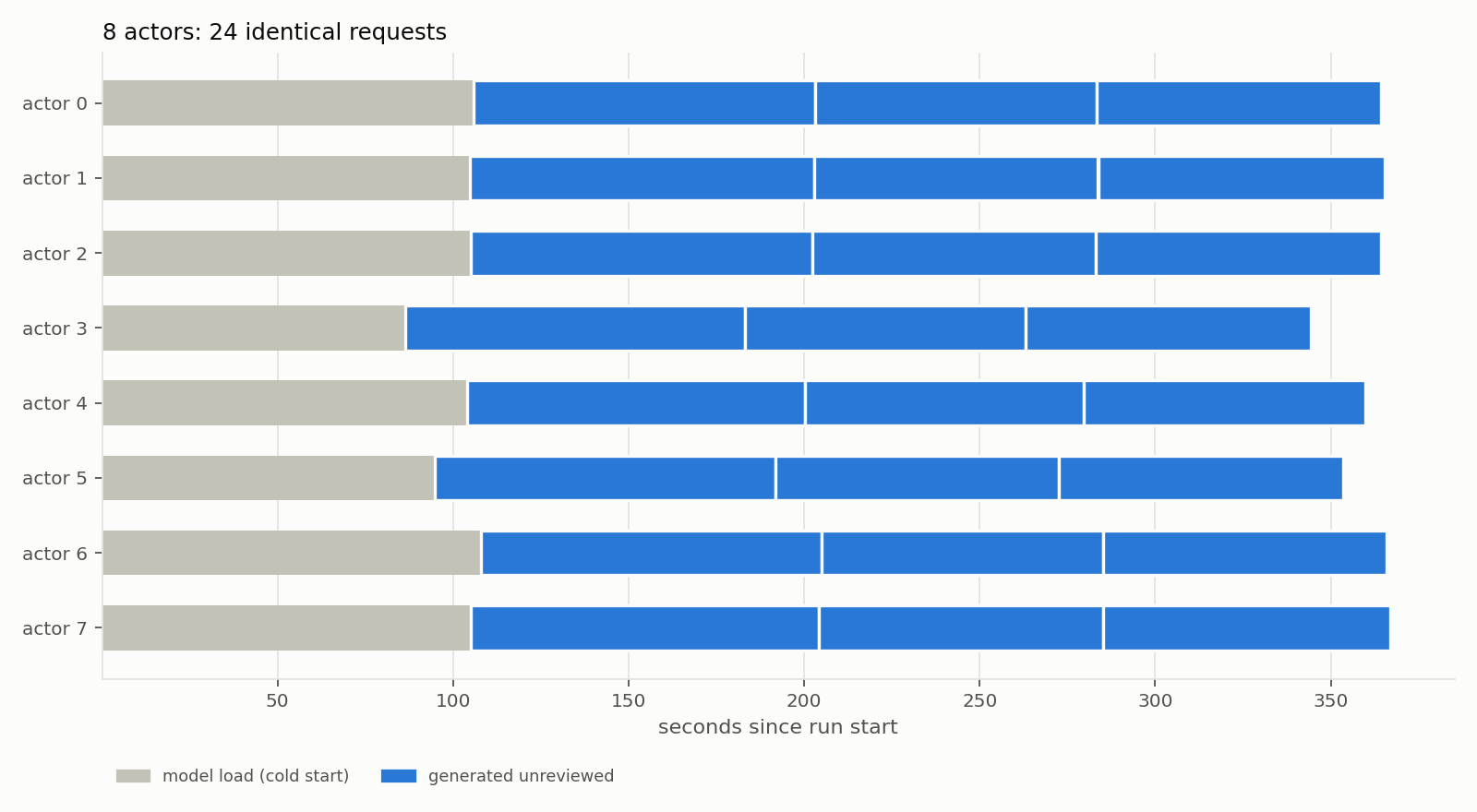
End-to-end speedup includes a fixed cold start of about 106 seconds per actor (loading the model), spread over only 3 requests per actor in the 8-actor case. On longer runs that cost fades: the main run below spent 88 seconds before its first dispatch and 51.5 minutes generating.
The main run
The main run crossed 24 clips with 4 conditions (fog, rain, night, snow) and 3 seeds: 288 requests on 8 A100s. All 288 succeeded on the first attempt in 3089.64 seconds, with no out-of-memory errors, no infrastructure failures and no replacement actors. Run one after another, the same work would take 23,219 seconds of GPU time.
Where the time goes
The 4 denoising steps account for 79% of each request. Everything around them is small, so the throughput lever is the number of GPUs working in parallel.
| Stage (median of 288) | Seconds | Share |
|---|---|---|
| Denoising, 4 steps | 63.57 | 79.1% |
| Video guardrail | 5.03 | 6.3% |
| Writing output and control videos | 4.85 | 6.0% |
| Decode and postprocessing | 4.03 | 5.0% |
| Preprocessing | 1.18 | 1.5% |
| Text guardrail | 0.64 | 0.8% |
| Total per request | 80.32 | 100% |
One prompt, many drives
Because the trail structure comes from each recording, one prompt produces a different but consistent scene on every drive. Night rain scored highest of the ten extra conditions in our automated review.
What we can measure automatically
We scored every output with a Ray Data pass on CPU. Edge F1 compares the output's edges with the source clip's edges within 2 pixels; it measures how much structure the repaint keeps, not how good it looks. Fog scores lowest, which is expected because fog hides distant edges.
| Condition (72 outputs each) | Edge F1 vs source | Change in brightness |
|---|---|---|
| Snow | 0.820 | +17.3 |
| Rain | 0.779 | −33.9 |
| Night | 0.640 | −82.4 |
| Fog | 0.529 | +7.8 |
Two lessons came out of the metrics. First, HSV saturation overstates color on dark frames because it divides by brightness: night outputs read 170.7 against 41.8 for the source. A brightness-independent measure, CIELAB chroma, shows a real but smaller rise from 8.47 to 15.44. Second, an automated vision-language judge (Cosmos-Reason1-7B, blind to the requested condition) is weak evidence: it labeled 64 of 71 rain clips "overcast". We used its scores only to rank showcase candidates. Human review of the outputs is still to come.
Where it breaks
Our automatic checks flagged 6 of the 288 main-run outputs, all for frozen frames and all from one source clip where the vehicle barely moves. That clip already repeats frames, because the camera's 10 Hz recording is stretched to 16 fps, so we treat the flags as pointers for review rather than confirmed defects.
System design on Ray
Preparing clips, holding a large model on every GPU, keeping 8 GPUs busy, scoring hundreds of videos and serving a live app are five different scaling problems. Each maps to a Ray abstraction, and all of them share one cluster of 8 nodes with one A100 each.
Ray Data: prepare every clip once
Clip preparation decodes the raw camera frames, checks timestamps, resamples to 16 fps, encodes the model input, verifies it by decoding it back and computes the edge control. A Ray Data pipeline fans the work out one clip per block across the GPU nodes' CPUs, so the GPUs stay free for generation:
ds = (ray.data.from_items(runs, override_num_blocks=len(runs))
      .flat_map(plan_clips, num_cpus=1, resources=WORKER_ONLY)       # choose clip windows per drive
      .repartition(target_num_rows_per_block=1)                      # one clip per block
      .map(prepare_clip, num_cpus=2, resources=WORKER_ONLY,          # decode, resample, edges, verify
           compute=ray.data.TaskPoolStrategy(size=concurrency)))
ds.write_parquet(catalog_dir) # the prepared clip catalogRay Core: keep the model loaded in its own environment
Cosmos Transfer 2.5 pins its own PyTorch and CUDA stack, which differs from the driver's environment. Each generation worker is a Ray actor that starts one long-lived child process under the Cosmos interpreter and talks to it over a pipe. The model loads once per actor, in 52 to 57 seconds, and then serves every request sent to that GPU:
class CosmosActor:                               # created with ray.remote(CosmosActor), one GPU each
    def _start_child(self):
        rfd, wfd = os.pipe()                      # replies come back on a dedicated pipe
        self.proc = subprocess.Popen(
            [self.s["cosmos_python"], "-m", "offroad_ray.inference.subprocess_worker"],
            stdin=subprocess.PIPE, env=self._child_env(), pass_fds=(wfd,))

    def generate(self, req: dict) -> dict:     # model stays loaded between calls
        ...
A scheduler on ray.wait: one request in flight per GPU
Generation requests vary little in cost, so the scheduler keeps exactly one request in flight per actor and hands out the next one as soon as any finishes. It retries infrastructure failures on a replacement actor, never retries a guardrail block, validates every output and writes a record per request, so an interrupted run resumes from what is already done:
while pending or in_flight:
    done, _ = ray.wait(list(in_flight), num_returns=1, timeout=5.0)
    for ref in done:
        i, req, t0 = in_flight.pop(ref)
        record(req, ray.get(ref))                 # validate with ffprobe, write the record
        free.append(i)
    while free and pending:                    # refill idle GPUs immediately
        i, req = free.popleft(), pending.popleft()
        in_flight[actors[i].generate.remote(req)] = (i, req, time.time())
Ray Data: score 288 videos on CPU
The quality pass reads every output, computes edge agreement, brightness, contrast, color and temporal metrics, and aggregates them per condition. It ran on all 288 outputs in 60.12 seconds and also builds side-by-side review images for a static review page:
ds = ray.data.from_items(rows, override_num_blocks=len(rows))
metrics = ds.map(compute_output_metrics, num_cpus=2, resources=WORKER_ONLY,
                 compute=ray.data.TaskPoolStrategy(size=32))
metrics.write_parquet(metrics_dir)
summary = ray.data.read_parquet(metrics_dir).groupby("condition").aggregate(
    Count(), Mean("edge_f1"), Std("edge_f1"), Mean("delta_luma"), ...).to_pandas()
Ray Serve: the live app
The live app reuses the same actor class inside a Serve deployment. Each GPU replica accepts one request at a time. A CPU front end built on FastAPI serves the page, queues jobs and lets the browser poll for progress, so a request that takes 80 seconds never holds a connection open. Scene IDs act as multiplexed model IDs, which sends repeat requests for a drive to a replica that has already encoded it:
@serve.deployment(max_ongoing_requests=1, ray_actor_options={"num_gpus": 1, "num_cpus": 4})
class Painter:
    def __init__(self, settings):
        self.engine = CosmosActor(idx, settings)      # same engine as the batch pipeline

    @serve.multiplexed(max_num_models_per_replica=12)
    async def _scene(self, scene_id): return scene_id

    async def paint(self, req):
        await self._scene(serve.get_multiplexed_model_id())
        return await asyncio.to_thread(self.engine.generate, req)

# In the FastAPI front end: route each job to a replica that already holds its scene
self.painter.options(multiplexed_model_id=job["scene_id"]).paint.remote(req)
With guardrails on, 8 replicas were ready 121 seconds after deployment. In the recorded session, 8 drives finished 100.9 seconds after the click, with each clip taking 97.9 to 100.5 seconds. Those were the first requests on each replica, and the guardrail models were still warming up: the video check took 13.56 seconds against a median of 5.03 seconds in the batch run.
What did not make a single clip faster
We also tried to shorten the wait for one clip. Splitting a clip across GPUs with context parallelism was slower than a single GPU in both 2-node and 4-node configurations, because each node in this cluster has one GPU and the split adds network traffic to every step. Generating at 480p was about 3 times faster, but this distilled model is trained for 720p and the output turned to blur. torch.compile shaved a few seconds per clip, after warm-up runs of up to three minutes. Depth control, the other way to condition the model, needs the non-distilled model with 35 steps: 867.5 seconds per clip, 10.8 times the edge model. On this hardware the better strategy is more clips in parallel, which is what Ray makes easy.
Limitations
- The vehicle does not react. Motion and camera path come from the real drive, so a blizzard clip drives at the speed of a summer day. Choosing slow source segments for harsh weather helps.
- Edges carry texture. Dense grass produces dense edges, and under heavy rain or snow prompts that texture can turn into white foam. Sparser edge maps followed the prompt better in a small sweep (condition match 0.92 against 0.42 in our automated review) and are the next setting to test.
- No human review yet. All quality numbers here are automated, and the automated judge is weak evidence.
- Frame duplication. The camera records at 10 Hz and the model expects 16 fps, so slow clips already contain repeated frames.
Cost
The batch work in this post, from the first smoke test through the ten extra conditions, used 3.32 hours of cluster time on 8 GPU nodes: 26.55 node-hours held and 17.40 node-hours of active generation. The main run alone held 6.87 node-hours.
Key takeaways
A world foundation model can turn a few hours of real off-road driving into the same trails at night, in rain, in smoke or in autumn, while the geometry of every frame stays true to the recording. The work is dominated by a fixed 4-step sampler on each clip, so throughput comes from running many clips at once: per-request time stayed flat from 1 to 8 GPUs, and 288 clips finished in under an hour without a failed request.
Ray supplies the execution layer around the model: Ray Data for preparation and scoring, persistent actors that isolate the model's dependencies, a dispatch loop that keeps every GPU busy and resumes cleanly, and Ray Serve to put the same engine behind an interactive app.
Get started
Open the template on Anyscale (DRAFT: replace with the template link before publishing). It includes the batch pipeline, the quality pass, the Ray Serve app and the replay page shown above, which runs without GPUs. Enable GPU execution when you are ready to generate new clips.
Acknowledgements. Driving footage from TartanDrive 2.0 (CC BY 4.0); we thank its authors for making it openly available. Generation uses NVIDIA Cosmos Transfer 2.5 and the automated review uses Cosmos-Reason1-7B.
Get involved with Ray
To connect with the Ray community, join the Ray Slack or ask questions on the Discuss forum. To run this workload on managed Ray, get started with Anyscale. To learn more about Ray, see ray.io and docs.ray.io.